Showing posts with label Linux. Show all posts

2009-06-14

Apache Configuration File (Linux)

Linux Tutorial - Apache Web Login Authentication:

Apache configuration files: (refered to generically in this tutorial as httpd.conf or reside as the file .htpasswd, in the directory being protected.)

  • Red Hat / Fedora Core / CentOS: /etc/httpd/conf/httpd.conf or /etc/httpd/conf.d/application.conf
  • Novell SuSE: /etc/apache2/httpd.conf or /etc/apache2/conf.d/application.conf
  • Ubuntu (dapper 6.06) / Debian: /etc/apache2/apache2.conf or /etc/apache2/conf.d/application.conf
source: http://www.yolinux.com/TUTORIALS/LinuxTutorialApacheAddingLoginSiteProtection.html

2009-05-13

Ubuntu Proxy setting (Ubuntu)

When running a Ubuntu system behind firewall and where users are required to use proxy server for http and ftp access,
Apt-get on Ubuntu might not be working after fresh installation.

Linux system normally uses the http_proxy environment variable for the proxy setting.

Setting the http_proxy variable:
bash$ export http_proxy=http://<host>:<port>

If required login for your proxy server, specified it this way:
bash$ export http_proxy=http://<username>:<password>@<host>:<port>

you can add the above to your .bashrc file once it is working. (test using ping or apt-update)

2009-04-08

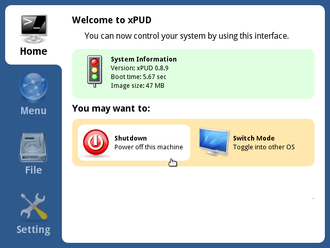
xPUD Linux Distro


Design From the Ground Up

xPUD is an unique Linux consists mainly of a web browser and a media player, with a simple user interface on top of it. It can turn your computer into a kiosk-like station by leverage some web technologies, that makes surfing and watching movies easy as a pie.
Thin and Rich at the Same Time

It's fast, averagely boots within 10 seconds (demo on YouTube), and the size is small, too. Weighs under 48MB, yet still compatible with most major Linux distributions like Ubuntu or Fedora. So xPUD can not only be a great platform to deliver Web Apps, but also runs on Netbooks or All-in-one PCs.
Need Help?

This project is under heavy development, you may find further information in the design spec, and we're looking forward to any kind of feedback, please post on our forum or contact us directly.

2009-04-01

PuTTY Tray

For those who uses PuTTY in their dairy task might find the default color theme for PuTTY are boring.
I'm one of those people. I found this on the net, that some of you migth what to give it a try.

PuTTY Tray is an improved version of PuTTY (Win32). It features some cosmetic changes, and a number of addons to make it more useful and much more fun to use.

source: http://www.xs4all.nl/~whaa/putty/

You could also add color theme to your putty

source: http://www.igvita.com/2008/04/14/custom-putty-color-themes/

ShareThis